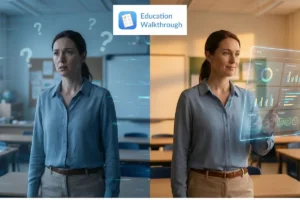
Teachers want to get better for their students, but vague or delayed walkthrough feedback can make growth feel confusing and stressful. Without clear guidance, it’s hard to know what’s working and what needs to change.
Classroom observation apps make the process easier by giving teachers fast, practical insights they can actually use. Instead of guessing, teachers get clarity and support right when they need it.
In this article, you’ll discover the top classroom observation app features that truly support teacher growth and how they help make observations simple, encouraging, and genuinely helpful for everyday teaching.
Principales conclusiones
- Classroom observation apps provide immediate, data-driven feedback that supports teachers’ professional development and enhances student engagement.
- AI-powered analysis and multimedia evidence collection enable personalized and actionable insights, promoting continuous improvement in teaching practices.
- Cost and time efficiencies from digital observation tools enable schools to allocate more resources to teaching, thereby improving operational performance.
How Does Immediate Feedback Drive Professional Growth
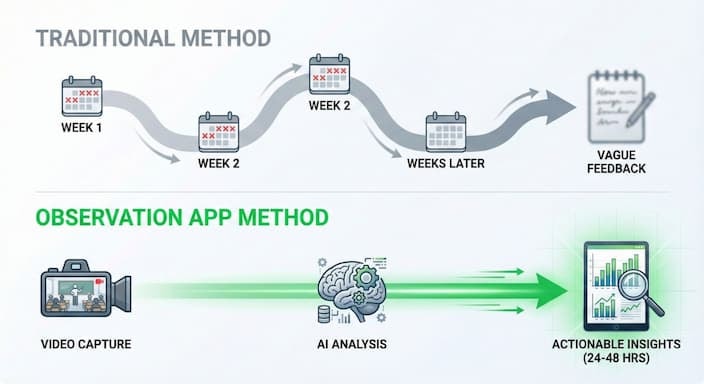
Immediate feedback is one of the strongest drivers of professional growth. With classroom observation apps, teachers receive immediate feedback in real time or within 24–48 hours, often before the observer leaves the room. This fast turnaround helps refine instructional strategies without waiting weeks for answers.
Teachers using digital observation tools save an average of 13 minutes per observation, totaling nearly three full workdays annually across 100 observations. More importantly, feedback is data-driven, objective, and tied to classroom evidence, helping teachers act confidently on what matters most.
Apps powered by AI further personalize the professional learning experience by analyzing observation data and offering tailored recommendations. When teachers see feedback as effective, it reinforces a continuous improvement loop that supports long-term professional growth.
Real-Time Video Recording and Annotation
Video recording allows teachers to revisit their instructional practices and reflect independently, rather than relying on memory. Annotating videos at specific time stamps creates more explicit, more actionable conversations during teacher observations. This ensures feedback is tied to particular classroom moments rather than general impressions.
Teachers who use recorded and annotated observations show measurable gains in classroom performance because they can identify strengths, refine strategies, and compare growth over time. This simple feature elevates the entire observation process and makes professional learning more focused and supportive.
AI-Powered Analysis and Recommendations
AI has become a game-changer for professional development. These systems review classroom recordings, identify key teaching moments, and provide data-driven, objective feedback aligned with pedagogy. This reduces bias and ensures that teachers receive fair, specific insights they can use right away.
AI tools also support professional learning by:
- Highlighting instructional patterns across lessons
- Personalizing recommendations to each teacher’s context
- Linking feedback to relevant research and strategies
Apps that collect and analyze diverse evidence types, such as text, video, audio, and photos, give teachers a clearer picture of classroom dynamics. When AI is used to guide reflections and action plans, teachers report stronger professional growth and higher confidence in improving instructional decisions.
Multimedia Evidence Collection
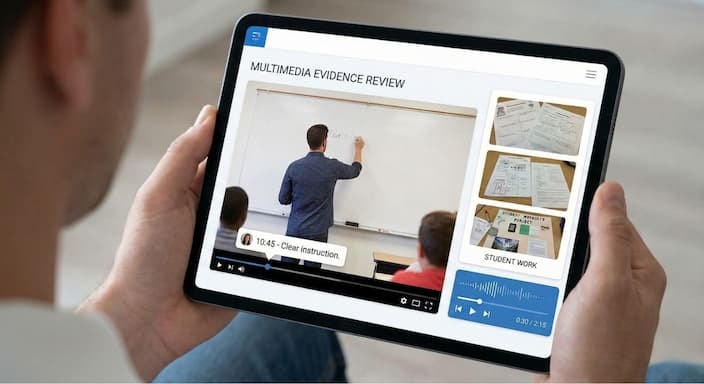
One of the most valuable strengths of modern observation apps is their ability to capture teaching moments in multiple formats. Instead of relying solely on memory, teachers and observers can review audio recordings, video clips, and photos to create a more accurate picture of what truly happened in the classroom.
Seeing concrete moments on screen makes constructive feedback clearer and easier to apply. Teachers don’t just hear what to improve; they can watch what worked, what didn’t, and how students responded. This builds trust, supports educator growth, and strengthens collaboration between teachers and school leaders, ultimately improving student outcomes.
Apps like Education Walkthrough use multimedia evidence to simplify the feedback conversation rather than complicate it. With everything stored in one place, teachers can review feedback at their own pace and use it in a supportive coaching cycle rather than a high-pressure evaluation.
Customizable Observation Templates
Customizable observation templates give structure to the evaluation process without making it rigid. Instead of one-size-fits-all observations, teachers receive feedback aligned with instructional goals, student needs, and school priorities.
Templates grounded in teaching frameworks reduce subjectivity and ensure that every teacher is evaluated fairly, whether they’re new or experienced. When paired with data analytics, these templates highlight patterns in instructional practices and guide teachers toward meaningful professional development.
Personalization matters here, too. Teachers can select focus areas based on observation insights, encouraging ownership of their growth journey. This approach supports higher teacher retention, promotes educator confidence, and makes feedback something teachers benefit from rather than fear.
Tools like Education Walkthrough make this process even easier by simplifying data tracking and automatically connecting observations to growth areas and coaching goals.
Data Analytics for Teacher Growth
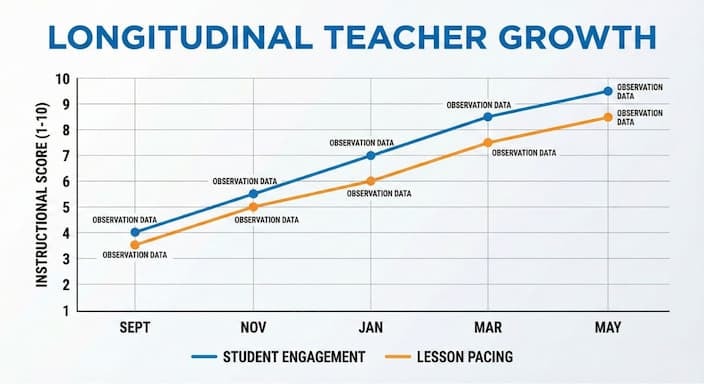
When classroom observations are backed by data analytics, professional development becomes more precise and more purposeful. Instead of guessing what to improve, teachers can see real patterns across classrooms and identify exactly which strategies boost learning.
Data analytics help:
- Identify patterns in instructional strengths and needs.
- Provide actionable feedback instead of vague comments.
- Support coaches in offering effective feedback that teachers can apply the very next day
Research shows how powerful this is. Teachers with high data-literacy skills demonstrate better instructional practices and improved student outcomes, yet many still lack access to strong data-focused professional development. Analytics closes that gap by making data collection valuable and straightforward. With dashboards and longitudinal tracking, 78% of teachers in PD programs say they can monitor their growth over time and tailor their learning paths, helping them take ownership of their own development.
This clarity also fuels collaboration. PLCs that use observation data report a 22% increase in shared instructional goals, sparking innovation and improving instructional practices across grade levels. When teachers feel supported, they’re more willing to experiment, reflect, and refine, ultimately increasing student engagement and improving outcomes.
Facilitating Asynchronous Coaching Conversations
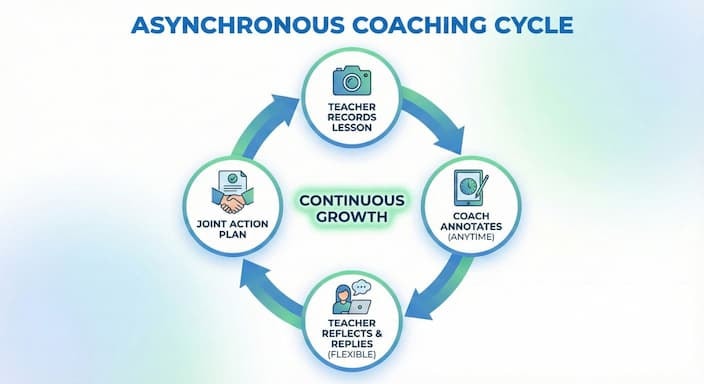
Not every teacher has time for in-person post-observation meetings — and that’s where asynchronous coaching becomes a game-changer. Teachers can respond to feedback when it fits their day, supporting deeper self-reflection and reducing pressure during the entire observation cycle.
This flexible format leads to better engagement:
- 65% of teachers report higher engagement with asynchronous feedback than with traditional sit-downs
- Teachers can revisit insights anytime, helping connect feedback to real classroom moments
- Notes and comments create an ongoing record of growth, rather than a once-a-year evaluation
Asynchronous coaching also works for teachers at different tech skill levels. Whether tech-savvy teachers or newer to digital tools, the format supports everyone without adding stress.
Education Walkthrough make analytics and asynchronous coaching effortless, so teachers spend less time navigating software and more time improving instruction.
Want to see how streamlined, data-driven feedback can accelerate teacher growth?
Book a demo with Education Walkthrough today.
Enhancing Self-Reflection Through Video Reviews
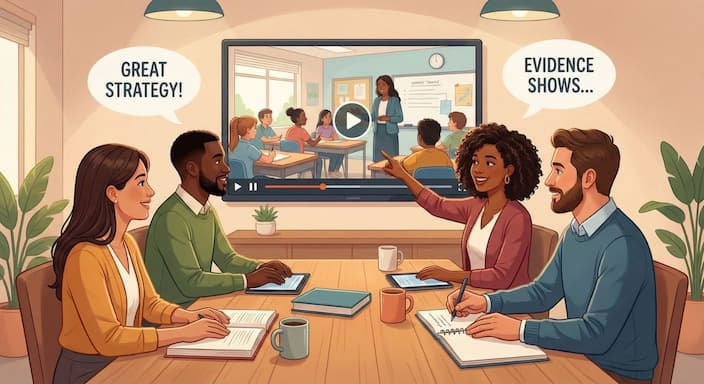
Video reviews give teachers something traditional notes never can — the ability to see their own instruction in action. When teachers watch their lessons, they notice interactions, pacing, student reactions, and missed opportunities that are impossible to track from memory alone. This leads to more intentional decision-making and meaningful professional growth.
Teachers also control which clips they share, which makes reflection feel safe rather than evaluative. When feedback arrives alongside video timestamps, personalized feedback becomes easier to apply and less emotionally taxing.
Over time, this builds confidence and fosters personalized professional development driven by teacher ownership rather than pressure.
A strong video reflection cycle typically includes:
- Watching key moments after class
- Identifying one strength and one growth focus
- Sharing clips (optional) for coaching or peer input
- Revisiting recordings over time to see progress
This consistent reflection supports steady growth without overwhelming educators.
Building Collaborative Professional Learning Communities
When teachers learn together, growth accelerates. PLCs allow educators to review clips, dissect moments of intense instruction, and troubleshoot challenges together. Instead of relying on opinion, conversations are grounded in classroom evidence, creating a feedback culture based on trust and curiosity rather than judgment.
What makes collaborative PLCs powerful:
- Teachers exchange practical strategies instead of abstract theory
- Everyone sees real examples from real classrooms
- Shared resources support professional development initiatives across the school
- Collective learning reduces isolation and builds morale
Secure libraries keep observation data private while still allowing educators to learn from each other. Schools that use PLCs consistently report stronger teaching practices and improved student outcomes, not because teachers are pushed harder, but because they feel supported.
Ensuring Data Security and Privacy
For teachers to engage fully, they need to trust the platform. The strongest observation tools protect teacher content and make growth accessible regardless of device or tech experience. Key elements include:
- GDPR-level compliance and teacher-controlled sharing
- Security through two-factor authentication
- Compatibility across phones, tablets, and desktops
- Interfaces are simple enough for all tech skill levels
- Accessibility accommodations and multiple language options
When educators feel safe and included, participation rises, and professional development becomes something teachers want rather than endure. Education Walkthrough’s secure recording and controlled-sharing model is one example of a feature set designed to protect teachers while supporting open dialogue and professional learning.
Accessibility and Inclusivity Features
For teachers to engage fully, they need to trust the platform. The strongest observation tools protect teacher content and make growth accessible regardless of device or tech experience. Key elements include:
- GDPR-level compliance and teacher-controlled sharing
- Security through two-factor authentication
- Compatibility across phones, tablets, and desktops
- Interfaces are simple enough for all tech skill levels
- Accessibility accommodations and multiple language options
When educators feel safe and included, participation rises, and professional development becomes something teachers want rather than endure.
Before adopting Education Walkthrough, ASDB relied on printed templates and handwritten notes. Walkthroughs were infrequent, feedback was slow, and leaders lacked visibility into patterns across classrooms.
After switching to Education Walkthrough:
- Walkthroughs increased from twice a year to quarterly + weekly drop-ins
- Teachers began receiving clear digital PDF feedback that they could revisit for goal-tracking
- Data revealed the classroom environment as a shared need, which led to campus-wide improvement strategies
- Customizable templates helped reduce the fear and pressure associated with feedback
- Video features in ASL made walkthroughs accessible to deaf and hard-of-hearing staff — a decisive factor in selecting the platform.
Meghan Boyle now shares insights from walkthroughs in webinars and newsletters, turning feedback from individual classrooms into knowledge that benefits the entire school. Read complete case study here
Cost and Time Efficiency
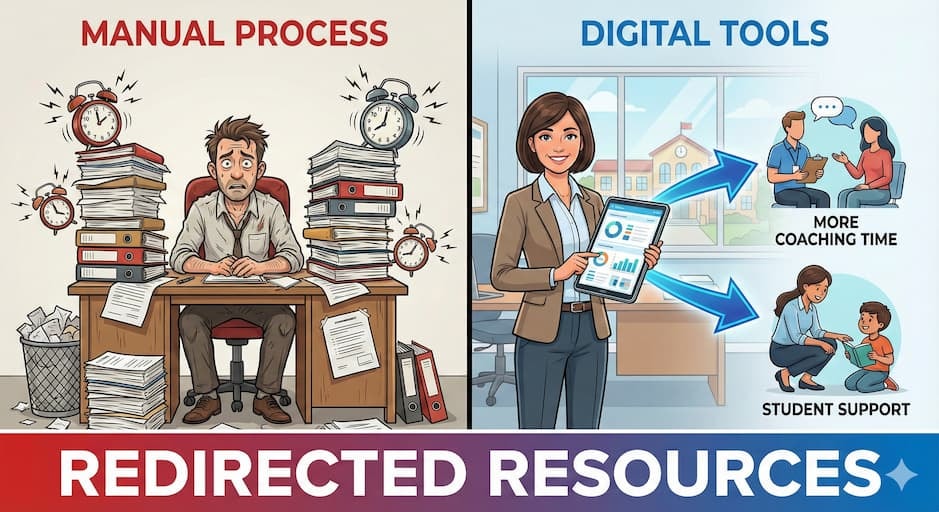
Digital walkthrough tools don’t just improve feedback; they give schools something priceless: time. When feedback is automated, and reporting happens instantly, administrators spend less time processing data and more time supporting teachers in the classroom.
Schools typically report:
- Fewer hours spent on observation paperwork and data entry
- Faster follow-ups after classroom visits
- More availability for coaching and mentoring
- Significant savings on printing and lost-form replacements
This efficient cycle keeps professional learning moving instead of stalling between walkthroughs. When time and money aren’t wasted, schools can redirect resources toward professional development, classroom support, and student-centered initiatives. Many districts highlight Education Walkthrough as a major driver of time savings, since walkthroughs and feedback occur within a single streamlined workflow.
Resumen
Classroom observation apps are reshaping professional development by giving teachers what matters most, timely, actionable, and supportive feedback. Features such as real-time insights, AI-powered analysis, multimedia evidence, and customizable templates help teachers refine instructional practices with clarity rather than guesswork. Tools that enable asynchronous coaching and PLC collaboration further strengthen school culture, making growth a shared, encouraging experience rather than an isolated task.
When privacy, security, accessibility, and inclusivity are prioritized, educators feel safe engaging openly in reflection and feedback. And because digital tools streamline countless hours of administrative work, schools gain more time and resources to invest directly in teaching and learning.
The future of teacher growth is not only about evaluation, but it’s also about support. Platforms like Education Walkthrough are helping schools make this shift by turning classroom visits into meaningful coaching moments that build confidence, strengthen instruction, and ultimately improve student outcomes.
Want to see how Education Walkthrough can support teacher growth in your school?
Preguntas frecuentes
Got more questions? Here’s a quick guide to the most common ones.
How do classroom observation apps deliver immediate feedback?
Classroom observation apps provide immediate feedback by offering automated insights and real-time notifications, enabling educators to receive valuable input on teaching practices almost instantly. This timely feedback can effectively enhance instructional strategies and student engagement.
What are the benefits of using video recording and annotation in classroom observations?
Using video recordings and annotations in classroom observations significantly enhances professional development by enabling teachers to receive targeted, specific feedback on their instructional practices. This method fosters reflective teaching and leads to more effective adjustments that improve student learning outcomes.
How does AI-powered analysis enhance teacher growth?
AI-powered analysis enhances teacher growth by providing personalized, data-driven feedback that identifies key teaching moments and offers actionable recommendations for improving instructional practices, ultimately supporting teachers in their professional development.
What role do customizable observation templates play in professional development?
Customizable observation templates are crucial for professional development, as they standardize evaluations and align them with educational standards and individual growth plans, ultimately enhancing the effectiveness of the observation process.
How do classroom observation apps ensure data security and privacy?
Classroom observation apps ensure data security and privacy by implementing two-factor authentication, complying with GDPR, and using secure recording systems that maintain teacher control over content until it is shared.