


A classroom walkthrough is only as effective as the focus behind it. Without clearly defined classroom walkthrough look-fors, two observers can visit the same lesson and walk away with completely different conclusions. Separating observation from evaluation keeps those two purposes from being confused in the first place.
One notices student discussion. Another focuses on pacing. Neither observation is necessarily wrong, but neither provides a consistent picture of what’s happening across classrooms.
So how do instructional leaders ensure everyone is looking for the same evidence during a walkthrough?
The answer is a shared set of observable indicators that define effective teaching and learning. These look-fors create a common language for classroom observations, making feedback more focused, data more reliable, and instructional conversations more productive.
Platforms like Education Walkthrough help schools put that consistency into practice by aligning observations around common instructional priorities.
In this guide, you’ll learn what classroom walkthrough look-fors are, the key categories to focus on, and practical things to watch for in classroom walkthrough visits.
What Actually Are Classroom Walkthrough Look-Fors?

Classroom walkthrough look-fors are pre-identified, observable indicators of effective teaching and learning that instructional leaders agree to focus on before entering a classroom. They aren’t compliance checklists, and they’re not tied to evaluation scores. Instead, they provide a shared lens for observing instruction.
When a principal and an instructional coach enter the same classroom using the same look-fors, they focus on the same observable evidence, such as student discussion, task alignment, or cognitive demand. This creates a more consistent picture of what is happening in the classroom and keeps post-observation conversations grounded in evidence rather than personal interpretation.
Why Look-Fors Matter
Look-fors help instructional leaders:
- Focus on observable evidence instead of impressions.
- Create a common language for classroom observations.
- Reduce variation between different observers.
- Connect feedback more directly to professional growth.
This is what separates look-fors from general observation notes. General notes often capture what an observer thinks. Look-fors capture patterns linked to instructional priorities that the school or district has already identified.
ASCD’s foundational framework for look-fors describes them as a “power tool” for instructional leadership because they shift the focus away from judging teacher performance and toward understanding what learning looks like in the classroom. That shift helps make walkthrough data more useful for coaching, professional learning, and school improvement.

Three Walkthrough Types and How Look-Fors Apply to Each
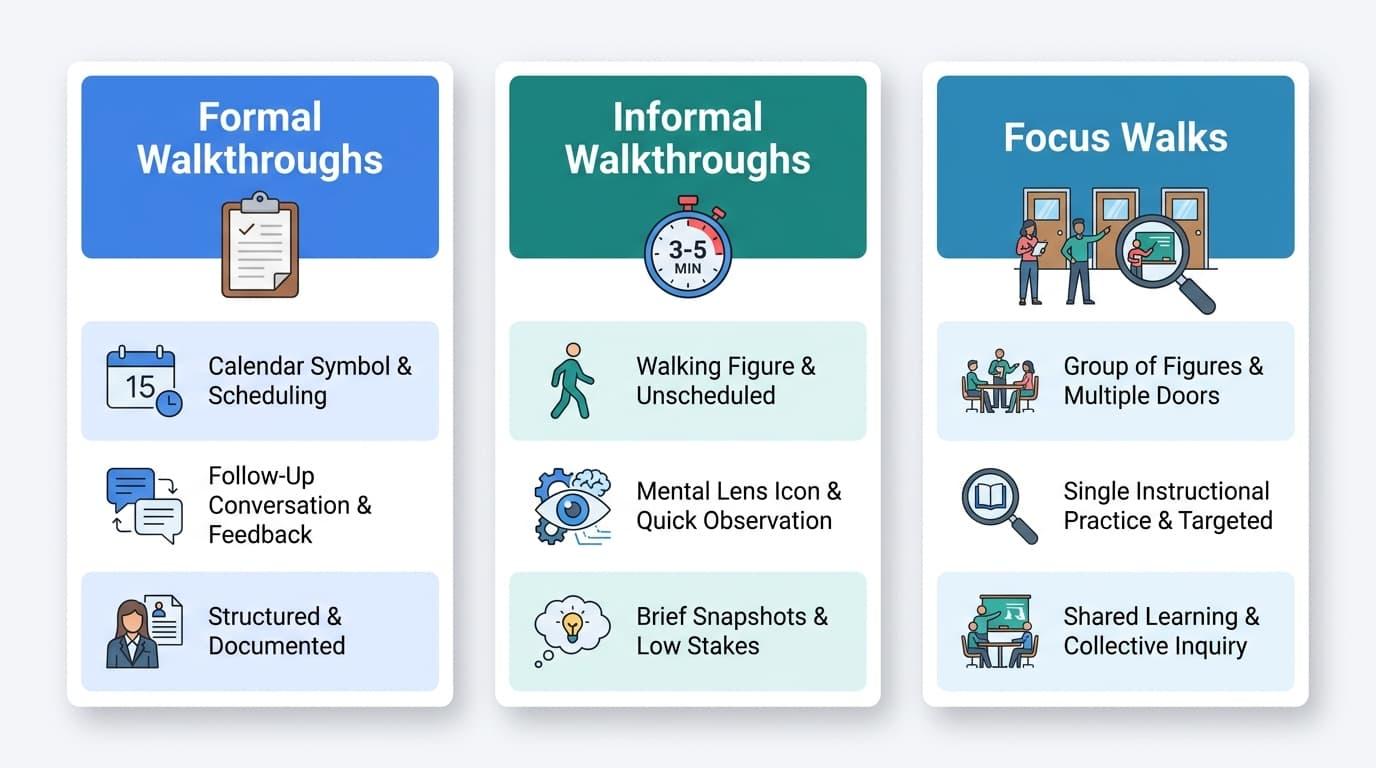
Not every walkthrough serves the same purpose, which means your look-fors shouldn’t always stay the same. The three most common walkthrough formats each require a slightly different observational focus.
Formal Walkthroughs
Formal walkthroughs are scheduled visits where you visit a classroom with a specific look-for instrument in hand.
In this setting, what you’re looking for is established in advance, the teachers know your visit is coming, and a follow-up conversation usually takes place afterward.
Because these walkthroughs often cover a broader range of look-fors, they work well in making the most of walkthroughs when a school is launching a new instructional initiative or conducting a mid-year review.
Informal Walkthroughs
Informal walkthroughs are brief, drop-in classroom visits, typically three to five minutes. In an informal setting, there’s no clipboard, no formal instrument, and no announced schedule. Look-fors are still important here, but they function differently. They serve as a mental focus filter rather than a written checklist.
An instructional leader who has internalized the school’s current look-fors already knows what evidence to look for. As a result, even a short visit can produce more consistent and comparable observations across classrooms.
Focus Walks
Focus walks involve a group of instructional leaders visiting multiple classrooms within the same grade level, department, or cohort while looking for a single instructional practice. Instead of capturing a broad picture of classroom instruction, your attention stays fixed on one specific look-for.
This approach is especially effective for turning walkthroughs into tools for instructional growth at the school or district level. When everyone is looking for the same evidence across multiple classrooms, patterns become much easier to identify and discuss.
Read More: How Frequent Walkthrough Prevents Teacher Burnout and Turnover
The Three Core Categories of Look-Fors
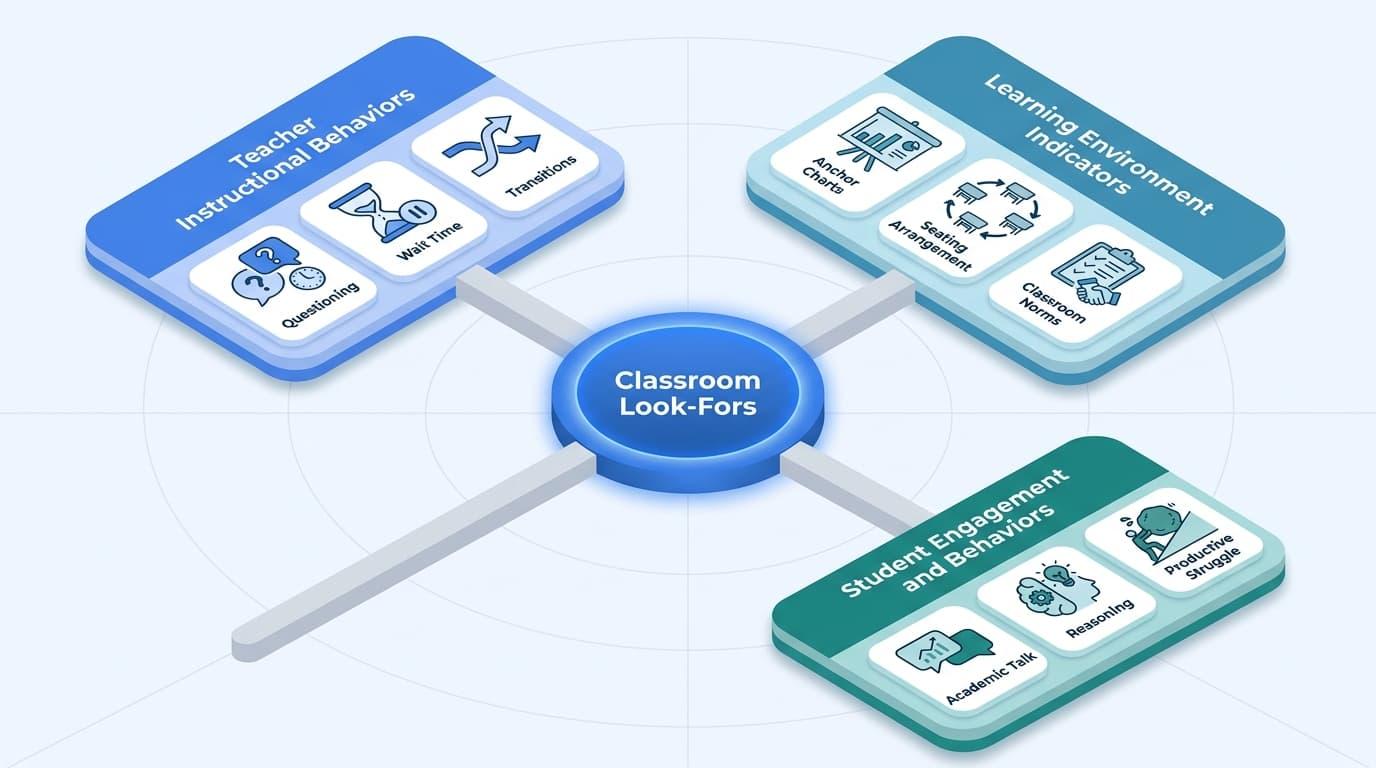
Look-fors generally fall into three categories: teacher actions, student behaviors, and learning environment indicators.
Identifying critical look-fors in classroom observations means paying attention to all three, because each one reveals a different part of the instructional picture.
Teacher Instructional Behaviors
Teacher actions are often the easiest things to observe because they are visible and happen throughout the lesson. When looking at this category, you’re paying attention to the instructional choices a teacher makes, which helps observers notice specific instructional strategies and teaching skills during the lesson, and how those choices shape learning.
Common examples include:
- How questions are framed and delivered.
- Whether wait time is used before accepting responses.
- How understanding is checked during the lesson.
- The clarity of directions and transitions.
To look at this in practice, a teacher who immediately calls on the first raised hand is making a different instructional move than one who gives every student time to think and respond before discussion begins, though those moves can look different across subjects and should be interpreted in the context of the lesson content.
Student Engagement and Behaviors
Student behaviors show whether instruction is producing the kind of thinking the lesson is designed to promote. This category goes beyond simply asking whether students appear on-task.
Think of it like checking the output of a system rather than the inputs. You are experimenting with what to look for during classroom walkthroughs in terms of student thinking and participation.
Are students explaining their reasoning? Are they building on a classmate’s idea? Are they working through productive struggle?
In strong classrooms, students use academic talk to explain ideas, respond to classmates, and work through problems aloud.
A student quietly copying notes may look engaged, but a student defending a claim to a partner reveals a much deeper level of cognitive engagement.
Learning Environment Indicators
The learning environment provides important clues about how well the classroom is set up to support instruction. This includes both the physical environment and the routines students follow every day.
As you observe, look for evidence that the environment is aligned with the learning taking place. Are anchor charts connected to current learning? Does the seating arrangement support the task the students are working on? Are classroom norms visible and followed without constant reminders?
These signals help you understand whether the classroom has been intentionally designed to support the instructional practices happening inside it.
How Shared Look-Fors Changed Walkthrough Culture
When look-fors are used consistently across classrooms, they stop being abstract categories and start shaping real instructional practice. That same consistency is the goal behind calibration across classroom observations. In Carroll County Middle School, a shared walkthrough system helped teachers and leaders focus on the same evidence, using the same language, during every visit.
Over time, this consistency shifted walkthroughs from something teachers prepared for defensively into something they began using to guide their own instructional growth.
10 High-Impact Classroom Walkthrough Look-Fors
Each example below highlights a classroom walkthrough look-for drawn from the three categories covered earlier. You’ll see what the look-for means, the observable evidence to watch for, and a coaching question that can help guide productive follow-up conversations.
For additional examples, explore the top 50 look-fors during classroom observations.
| S/N | Look-For | Definition | Observable Evidence | Coaching Question |
| 1 | Academic Discourse | Students engage in meaningful academic conversations that deepen understanding of the content. | Students face one another during discussion and address a partner or group without teacher prompting. | What structures are you using to give students practice with academic language before whole-group discussion? |
| 2 | Higher-Order Questioning | You ask questions that require students to analyze, evaluate, or think beyond simple recall. | The teacher asks questions with no single correct answer. Multiple students offer different responses to the same prompt. | How do you decide which questions are worth slowing down for during a lesson? |
| 3 | Student Self-Assessment | Students monitor and reflect on their own learning progress | Students mark their own work against a visible criteria list while also writing down what they still need to practice. | How are students currently using self-assessment data to make decisions about their next steps? |
| 4 | Formative Checks for Understanding | You gather real-time evidence of student learning during the lesson. | The teacher pauses instruction and asks all students to respond simultaneously via whiteboards, hand signals, or written exit responses. | How do you respond when a mid-lesson check reveals misconceptions or gaps? |
| 5 | Learning Target Visibility | The learning goal is visible and actively referenced throughout the lesson. | A written learning target is visible in the room. The teacher or students refer to it during the lesson. | When do students engage with the learning target beyond simply reading it? |
| 6 | Student-to-Student Interaction | Students discuss content directly with one another rather than communicating only through the teacher. | Students respond directly to a peer’s comment or question. Students build on, challenge, or clarify each other’s ideas during discussion. | How do you structure discussions so students stay focused on the learning? |
| 7 | Differentiated Instruction | You adjust tasks, supports, or materials to meet different student needs. | Different students work on different versions of a task. The teacher provides additional support or prompts where needed. | How do you determine which students need additional support or a different entry point? |
| 8 | Growth Mindset Language | Language used by both you and your students treats effort, mistakes, and revision as part of learning. | The teacher uses phrases such as “not yet” or “what would help you get there.” Students explain what they have already tried before asking for help. | What classroom norms help students view mistakes as opportunities to learn? |
| 9 | Clear Directions and Transitions | Instructions are clear, and transitions between activities happen smoothly. | Students begin tasks shortly after directions are given. Materials are distributed or put away without repeated reminders. | How do you know students understand expectations before they begin working? |
| 10 | Prior Learning Activation | New learning is connected to what students already know or have previously learned. | The teacher references a prior lesson, unit, or student experience. Students make verbal or written connections to previously learned content. | How do you decide which prior knowledge is most important to activate before introducing new content? |
Co-Designing Look-Fors with Teachers
Most look-for instruments are created by principals, assistant principals, or other administrators and then handed to teachers. While that approach is efficient, it can create exactly the kind of walkthrough anxiety you should be working to avoid.
When teachers have little input into what observers are looking for, walkthroughs can feel evaluative rather than developmental. What changes when they participate in defining the look-for?
Co-designing look-fors creates a shared understanding of what effective practice looks like before anyone enters a classroom. Involving educators early also helps build trust before walkthroughs begin. Research on teacher perspectives on the classroom walkthrough process shows that involving teachers in the design process reduces defensiveness and increases openness to feedback.
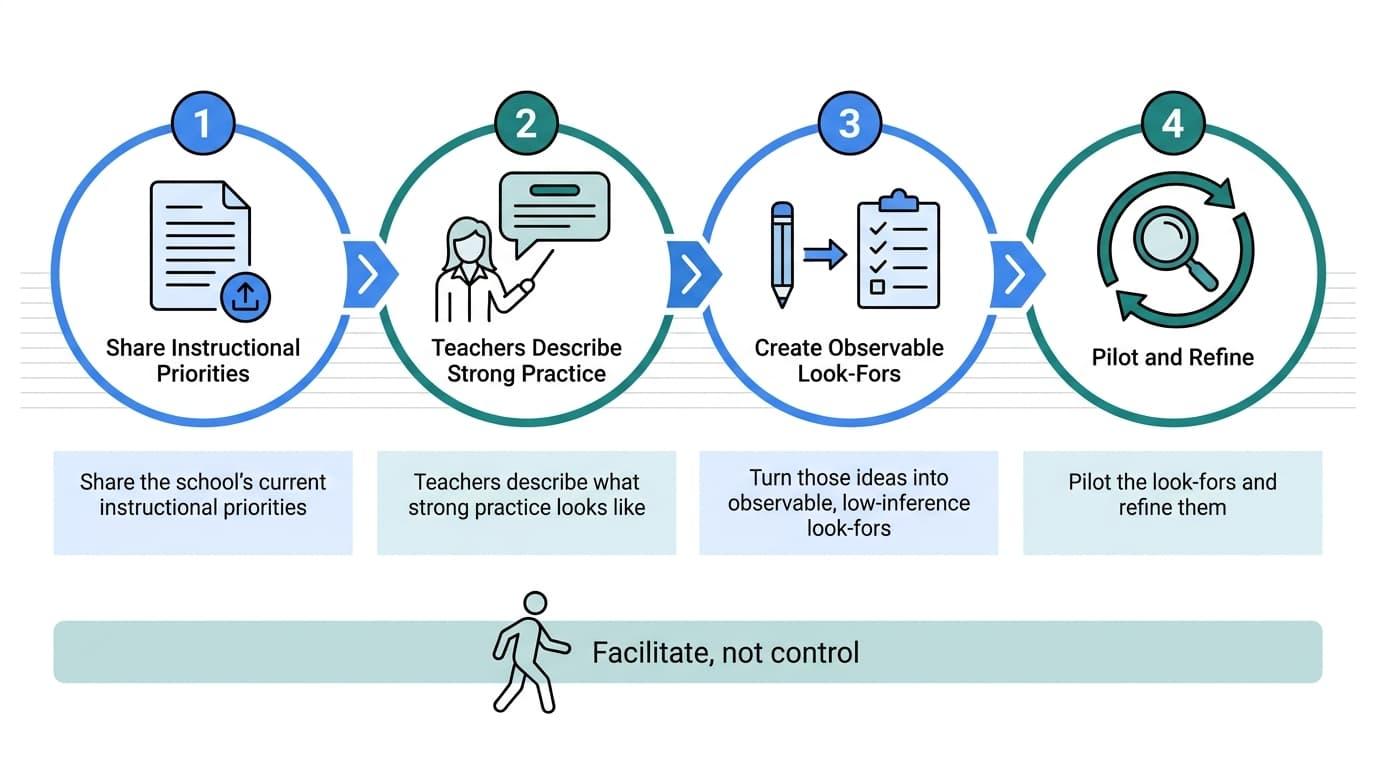
The process doesn’t require a new initiative or additional meetings. You can build it into existing PLCs (Professional Learning Communities), department meetings, a faculty meeting, or development sessions to explain the purpose of walkthroughs and gather input. A simple process might look like this:
- Share the school’s current instructional priorities.
- Ask teachers to describe what strong practice looks like in their classrooms.
- Turn those ideas into observable, low-inference look-fors.
- Pilot the look-fors and refine them based on what observers actually find useful.
The role of the principal, instructional coaches, or other leaders is to facilitate the conversation, not control it, and to stay genuinely interested in teacher perspectives throughout the process. Asking one question every principal should ask teachers before finalizing a look-for framework can uncover blind spots that top-down designs often miss.
When teachers help shape the observational lens, walkthroughs feel less like something being done to them and more like a process they helped build. That shared ownership often makes feedback easier to trust and act on.
Aligning Look-Fors to Schoolwide Instructional Goals
Look-fors should not remain fixed throughout the year. As your school’s instructional priorities change, your observation focus should change too, especially when those shifts reflect changes in curriculum as well as broader instructional goals.
If academic discourse is a current goal, your walkthroughs should focus on student discussion, peer-to-peer exchanges, and the questions teachers use to promote thinking.
What happens when walkthroughs rely on a generic checklist that no longer reflects the school’s priorities? Over time, the observations become less meaningful.
The evidence you collect becomes harder to connect to improvement efforts, and walkthroughs start feeling routine rather than purposeful.
To keep walkthroughs aligned with school goals:
- Update Look-Fors Regularly: Rotate them by month, quarter, or instructional cycle so observations stay connected to the work your school is actively pursuing.
- Look Beyond Individual Classrooms: The greatest value often comes from identifying patterns across teams, grade levels, and departments.
This is where walkthrough data becomes especially useful. When you review observations across multiple classrooms, school leaders and other instructional leaders can use cross-classroom patterns to assess implementation across teams rather than focusing only on individual schools, and the conversation shifts from individual teaching practices to broader instructional trends.
For example, inconsistent student engagement across grade levels may signal a professional development need.
Strong formative assessment practices in one department and weak implementation in another can help you decide where coaching support should be focused next. This is the feedback loop in instructional coaching that connects classroom visits to continuous improvement.
Schools that use look-fors as a planning tool rather than a compliance exercise can use observation data to set goals, shape professional learning, and direct support where it will have the greatest impact, as demonstrated by one district aligned to instructional leadership priorities, with some using observation tools developed around district priorities to keep the process consistent.
Low-Inference Note-Taking and Calibration for Consistent Observations
The value of walkthrough data depends on how consistently it’s collected. Two practices support that consistency: low-inference note-taking and observer calibration.
What Low-Inference Note-Taking Looks Like in Practice
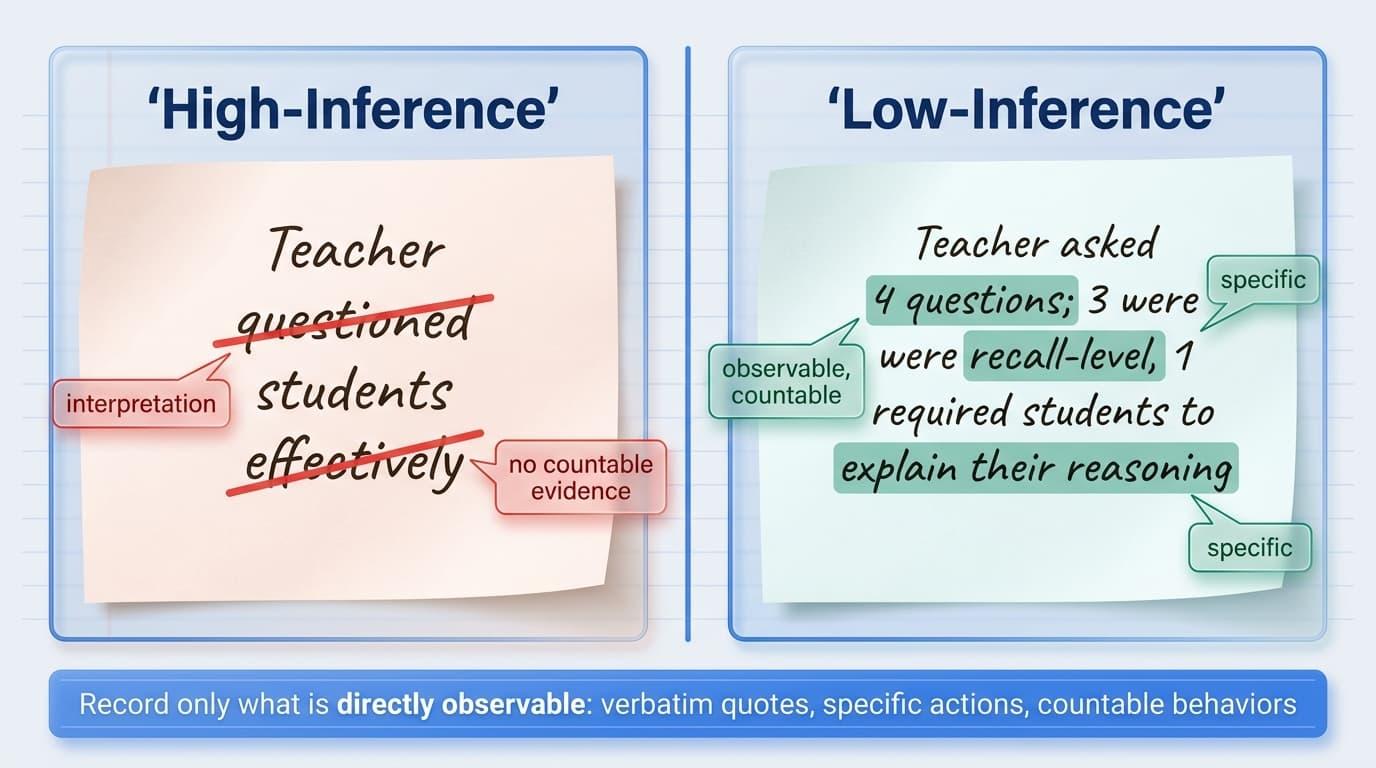
Low-inference note-taking means recording only what is directly observable such as verbatim quotes, specific actions, and countable behaviors. It avoids adjectives, interpretation, and any judgment embedded in the language.
The difference becomes clear when you see it side by side.
- High-inference: “Teacher questioned students effectively.”
- Low-inference: “Teacher asked 4 questions; 3 were recall-level, 1 required students to explain their reasoning.”
The second version gives instructional leaders something usable. Feedback is not the same as critique; it returns information to the source so adjustments can be made. It describes what happened without deciding what it means. Words like “effectively” or “engaging” reflect interpretation, not evidence.
Removing that layer keeps the focus on what was actually seen. This discipline protects both teachers and observers. When notes capture only observable actions, teacher observation feedback supports providing feedback and makes effective feedback easier to deliver and easier to receive because it is grounded in shared reality rather than personal impression.
Consistency in observation starts with having the right structure behind every walkthrough. Education Walkthrough gives you the tools to collect clear evidence and keep coaching conversations focused and actionable.
Make Walkthroughs More Actionable
Calibration and Inter-Rater Reliability
Calibration sessions help observers apply look-fors consistently before entering classrooms. Principals should rotate visits among the teachers they supervise to keep coverage fair and manageable, especially when teacher observations are shared across principals, assistant principals, or other leaders.
Teams review shared definitions, examine sample evidence together, and compare how they interpret the same classroom moments. Where interpretations differ, they adjust and realign until the evidence feels consistent across observers.
The goal is inter-rater reliability. If two observers visit the same classroom, they should record similar evidence and draw similar conclusions. Research on observer consistency in classroom observation shows that without this calibration step, observation data reflects individual interpretation more than classroom reality.
Once alignment is in place, look-for data becomes usable at scale because patterns across classrooms only hold when everyone is working from the same definition of evidence.
A Simple Walkthrough Template Framework
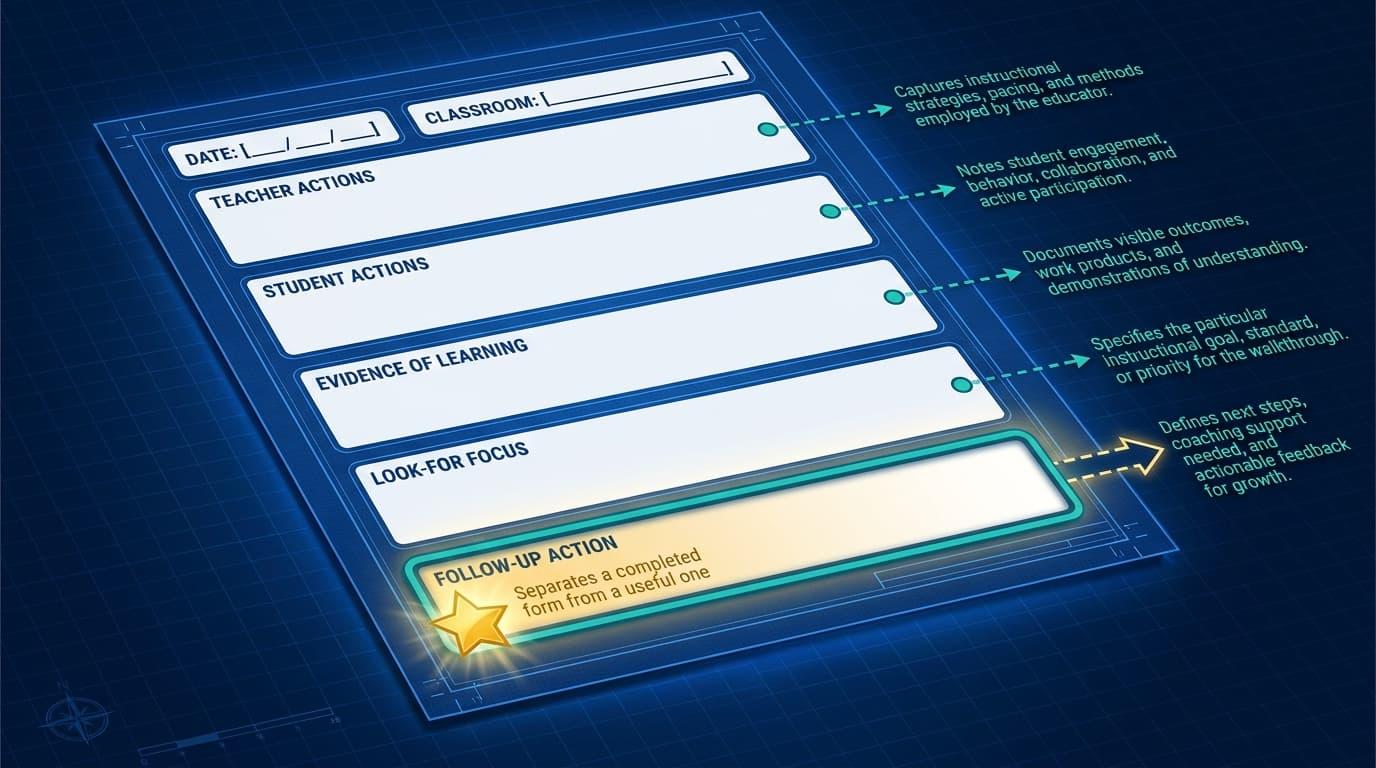
Most walkthrough forms try to capture too much at once. In practice, this slows the process down and takes attention away from what actually matters during a brief classroom visit.
As mentioned earlier, a practical classroom walkthrough template only needs a small number of focused fields to be effective. The goal is to capture clear evidence of what is actually happening in the classroom, not to document every possible detail.
Beyond the three core fields we’ve covered above, the template should also include a few supporting fields that help record evidence from a specific teacher’s classroom during short visits and connect observation to follow up action.
| Field | Purpose |
|---|---|
| Teacher Actions | Record observable teacher behaviors only |
| Student Actions | Record student behaviors and academic responses |
| Evidence of Learning | Note what students produced or demonstrated |
| Look-For Focus | Name the specific look-for guiding this visit |
| Follow-Up Action | Identify the next step before leaving the room |
The follow-up action field is what separates a completed form from a useful one. Frameworks for structuring classroom walkthrough observations support this three-part structure, and the research behind them points to the same principle that shorter templates produce more consistent data.
When every instructional leader in a building uses the same template, visiting classrooms becomes more consistent across the building, pattern analysis becomes possible, and aggregated data across classrooms tells a school-level story that individual notes never could.
Read More: Ways to Give Teachers Immediate Feedback After a Walkthrough
Connecting Look-Fors to Coaching Cycles, Professional Development, and Feedback to Teachers
Observation data sitting in a folder doesn’t improve instruction on its own; it should help teachers improve, not just document what happened. Look-fors only become useful when they feed directly into coaching conversations and professional development decisions.
Low-inference evidence gives you a simple starting point for those conversations. Instead of interpreting what happened, you describe it.
For example: “Students had 30 seconds to write before discussion in three lessons.” This keeps the focus on what was observed, not judgment, and makes feedback easier to discuss.
When look-fors guide the coaching cycle, the process becomes more structured. The cycle usually works like this:
- Observe classroom practice using shared look-fors.
- Share clear, evidence-based feedback from what you saw.
- Set a specific growth goal tied to instruction.
- Revisit the same look-fors to track progress.
This same cycle can also support literacy or English Language Arts goals when those are current instructional priorities.
This simple sequence turns walkthroughs into a repeatable improvement loop rather than isolated visits. When you step back, patterns become more important than individual moments.
One teacher working on formative assessment is a coaching conversation. But when several teachers show the same gap, it signals a broader professional development need. That’s where look-fors add real value, especially when coaches and principals use the evidence for follow-up.
Aggregated evidence helps you see what is happening across classrooms, not just inside one. Making instructional coaching a school-wide standard depends on that shared visibility and consistent response.
Making Classroom Walkthrough Look-Fors Work in Practice
Look-fors turn classroom walkthroughs from quick visits into focused instructional moments. When they are built collaboratively, grounded in low-inference evidence, and aligned with school priorities, they become a system for meaningful feedback rather than a simple checklist.
Effective instructional coaching always depends on clarity, and look-fors provide that clarity in practice.
Platforms like Education Walkthrough help bring this structure to life in real schools. It’s a streamlined, user-friendly platform that supports customizable look-fors, consistent evidence collection, and faster feedback loops that make walkthroughs more actionable for teachers and leaders. You can align observations, capture consistent evidence, and share feedback with teachers in a way that supports real instructional growth.
Improve Your Walkthrough Process Today
Frequently Asked Questions About Classroom Walkthrough Look-Fors
What is the difference between a look-for and an evaluation rubric?
A look-for focuses on specific, observable evidence of teaching and learning agreed upon for walkthroughs. A rubric assigns performance ratings and is used in formal evaluation. Look-fors are non-evaluative and support coaching conversations.
How many look-fors should be used in a single walkthrough?
For a 3–5 minute walkthrough, one to two look-fors is usually best. Broader sets work for formal visits, but too many look-fors reduce focus and lead to weaker, less reliable evidence.
How often should look-fors be updated or rotated?
Look-fors should change with school priorities, often by instructional cycle or monthly. If they stay the same too long, they lose relevance and stop reflecting what the school is currently working on.
Can look-fors be used in virtual or hybrid classrooms?
Yes. The focus stays on observable evidence of learning and instruction. In virtual settings, this may include chat responses, engagement patterns, or digital tool usage, while still keeping notes low-inference.
What is the best way to introduce look-fors to a skeptical staff?
Start with co-design. When teachers help define what strong practice looks like, walkthroughs feel less evaluative. Clear communication about how evidence will be used also builds trust and reduces resistance.

